

Best OBD2 Scanners (UK) & How to Read Fault Codes
The right OBD2 tool depends on the vehicle and the function you need. Reading an engine fault code is not the same as accessing ABS, registering a battery or programming a replacement module.
Start with the required function
- Basic engine-code reading: check generic OBD2 support for the exact vehicle.
- Manufacturer-specific diagnostics: check supported modules, model years and the required app.
- Service functions: verify the individual operation, such as battery registration, for your vehicle.
- OEM programming interface: check the device, OEM application, subscription, driver and computer requirements together.
USB and Bluetooth are different choices
A USB adapter needs a compatible computer, lead and driver. A Bluetooth adapter needs a supported wireless connection and app. Listing a phone operating system does not mean every diagnostic app or function is available on it.
Compare Vgate vLinker FS USB and Bluetooth before choosing a FORScan interface. Confirm the current FORScan and manufacturer requirements for the task you intend to perform.
Brand-specific examples
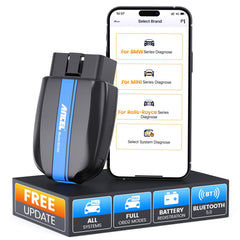
ANCEL BD300 is a BMW-oriented listing. Check coverage for your exact model and function, rather than assuming all-system support for every BMW.
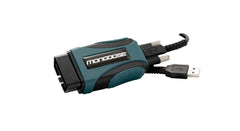
OPUS IVS Mongoose interfaces are offered in different OEM versions. Toyota-oriented Mongoose-Plus and Ford-oriented Mongoose-Plus listings should not be treated as the same all-makes device.
Before ordering
- Record the make, model, year, engine and required function.
- Check the manufacturer coverage for that combination.
- Confirm computer or phone requirements, app version and any paid licence.
- Check the complete hardware listing and included lead.
- For programming work, verify the OEM procedure and power-support requirements with a qualified professional.
What a code does and does not tell you
A fault code identifies a detected condition; it does not always identify the failed part. Do not replace parts solely because a scanner names a system. Clearing a code is not proof that the underlying fault has been repaired.
Compare diagnostic interfaces · Fault-code reference
Manufacturer references
See Vgate FS USB, Vgate FS Bluetooth and OPUS IVS Mongoose. This guide is a compatibility checklist, not a claim of hands-on testing.
Compare current listings
Check the exact specification and included components. Prices and availability come from the current product listings.